Cost and Weight Data
Layer Cost Data (Layer$)
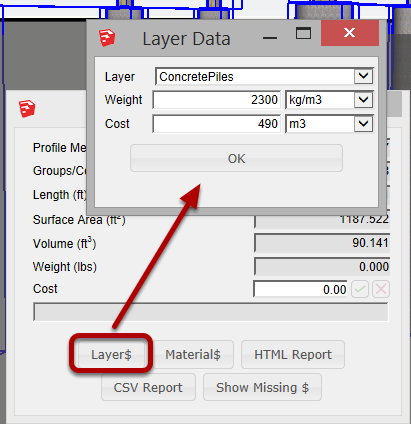
Unit weight and unit costs may be associated to a particular Layer in your model. All Objects on that Layer will use the assigned unit weights and costs in their particular quantity calculations.
Material Cost Data (Material$)
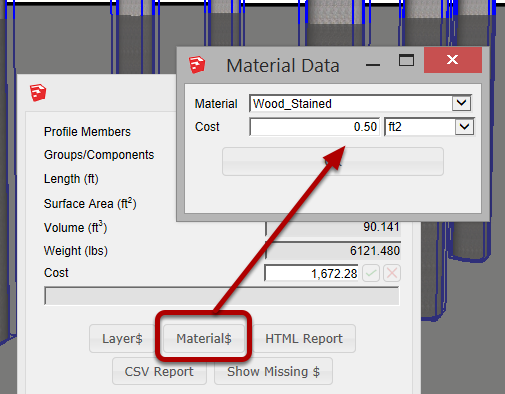
Costs per unit area may also be associated with a particular Material in your model. This feature is best used to calculate costs for surface finishes such as:
- Paint
- Flooring
- Tile
- Coatings
An object can have cost input from both Layers and Materials at the same time.
Instant Cost Estimates
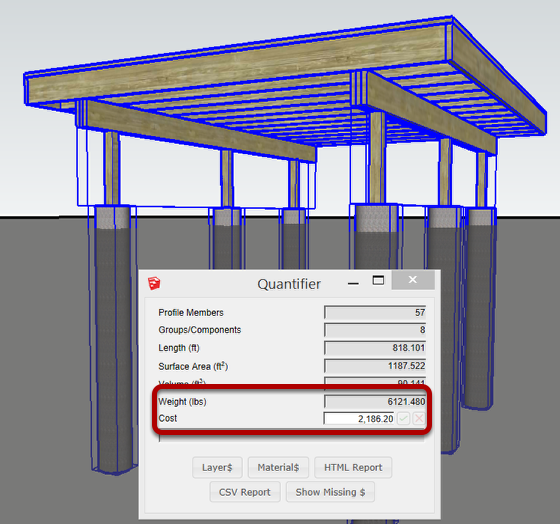
Once cost and weight data has been assigned, getting a cost and weight estimate is simply a matter of selecting the Objects that you are interested in.
Checking the Cost Calculation
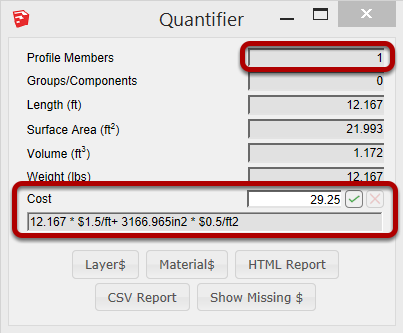
If you select a single Object, you can view the cost calculation and see if everything looks good.
Assigning a Cost to an Object
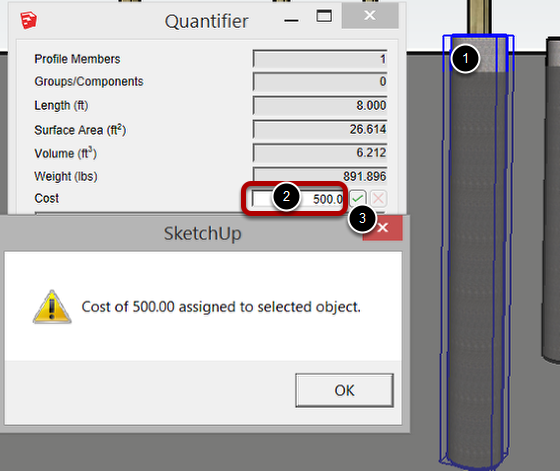
If you select a single Object, you can assign a cost to it directly and over-ride the calculated cost.
1. Select an Object
2. Input a Cost
3. Click the checkmark to apply.
Removing the Assigned cost

Select the object again to check the cost that as been assigned.
To remove the assigned cost, click the X.